To open this dialog select Options|Calendar Preferences... from the main menu.
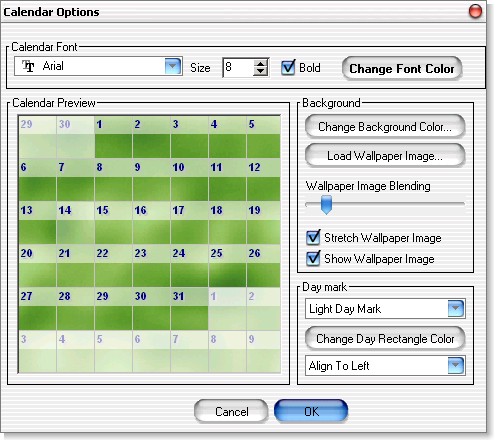
| · | Calendar Font section allows you to change the font face, size, style and color of the font used for the day numbers.
|
| · | Calendar Preview instantly shows how your calendar will look with current options selected.
|
| · | Background section allows you to change the background options of your calendar
|
- Load Wallpaper Image button - click to select an image to be used as the calendar wallpaper.
- Wallpaper image blending slider - slide left and right to achieve desired "whiteness" of the wallpaper image.
- Stretch wallpaper image - when checked - the wallpaper image will always fill the whole calendar.
- Show wallpaper image - check to use the wallpaper image you selected, otherwise the color will be used.
| · | Day mark section
|
- Change rectangle color button - click to change the color of the day mark rectangle (used only if (none) or (Light Day Mark) are NOT selected)
- Alignment drop down box - choose the placement of the day number inside the day box.
© 2005 Software River Solutions, Inc.