To open this dialog select File|Category Editor... from the main menu.
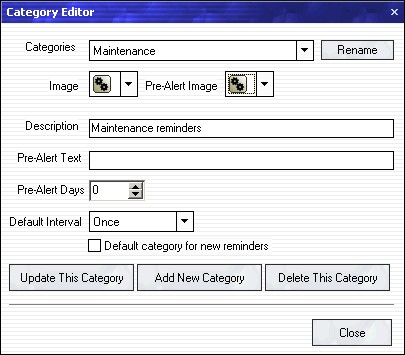
| · | Categories drop-down box - Select a category (reminder type) you want to modify or delete.
|
| · | Rename Button - Click to rename the current category.
|
| · | Image drop-down box - Select the image that should be used for this category.
|
| · | Pre-Alert Image drop-down box - Select the image that should be used for pre-reminders in this category.
|
| · | Description edit box - Type in a brief description of this category.
|
| · | Pre-Alert Text edit box - Type in a short text that will be used to automatically construct a pre-reminder for this category. See "Birthday" category for an example.
|
| · | Pre-Alert Days - Select 0 to disable the default pre-reminders in this category. If value other than zero is selected an automatic pre-reminder will be created for reminders of this type. The value represents the default number of days that a pre reminder will be activated before the main event.
|
| · | Default Interval drop down box - select the default interval type for this category.
|
| · | Default category for new reminders - Check this checkbox to make this type of reminder default when creating a new reminder.
|
| · | Update This Category Button - Click this button to save the changes you made for the current category.
|
| · | Add New Category Button - Click to add a completely new category.
|
| · | Delete This Category Button - Click to delete the current category. NOTE: Deleting a category will delete all reminders of that type. Use the search function to find reminders by category (type).
|
| · | Close Button - Closes this dialog.
|
Use this dialog to customize your reminder types and change their default values. Note that all values in a specific category except the icons are simply a default values. While creating a reminder one can always override the default values for a certain category.
However - appropriate default values will speed-up the reminder creation greatly as there will be less values to change.
TIP: If a category often requires a reminder of that type to have a pre-reminder few days before it actually starts - use the default Pre-Alert Days value and text in this dialog. When creating a reminder of this type - a pre-reminder option will be automatically selected for you.