To jump to a different section in the dialog - simply click on the little up/down arrow beside the section name.
To open this dialog select Options|General Settings... from the main menu.
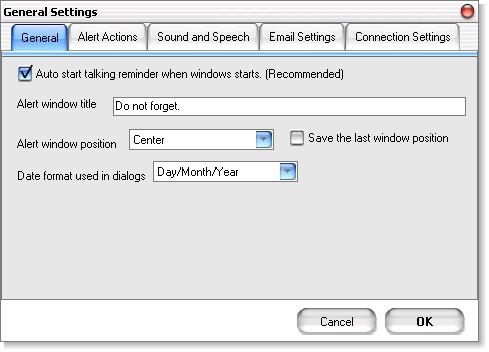
| · | Auto start talking reminder ... check box - check to start Talking Reminder when Windows starts. This option is recommended.
|
| · | Alert window title - enter the title for the alert window that will show up when an alert is shown. This is also used for speech output (if enabled)
|
| · | Alert windows position - select where on your display you would like a new alert window to pop up.
|
| · | Show control hints - if checked many controls will show a hint if you keep your mouse over them for a few seconds. This is useful, but after a while it could become annoying, thus an option to turn it off when you feel comfortable with the user interface.
|
 General Preferences dialog - Alert Actions Section
General Preferences dialog -Sound and Speech Section
General Preferences dialog - Email Section
General Preferences dialog - Internet Connection Section
General Preferences dialog - Alert Actions Section
General Preferences dialog -Sound and Speech Section
General Preferences dialog - Email Section
General Preferences dialog - Internet Connection Section